Facebook's Hidden Messages
- Jan 9, 2017
- 3 min read
Most people who use Facebook are blissfully unaware that they may be missing out on reading a lot of messages sent to them.

If a message that is sent to you is not from someone in your friends list then Facebook does one of two things with it; They either pop it into your "Message Requests" folder OR it goes into yet anther folder named "Filtered Requests". Sometimes they are nice enough to let you know in your "Notifications" drop down that you have received a message in your Message Requests folder (but not always), however many users don't even know they have a Message Request folder, let alone where it is.
Here I will briefly explain what these folders are for and where they are to be found - when you first open them to have a look you might just be surprised at how many messages you never read and how old some of them are.
The Message Request folder:

Here is a picture of your Messages folder. When you open it it will show you the "Recent" messages sent to you by people in your friends list, as in mine here. Just to the right of "Recent" you will notice "Message Requests" (written in a grey, not so easy to see text almost as if Facebook would rather you didn't notice it).

Ahhh - There it is! This folder contains messages sent to you by anyone who is not in your friends list. You may sometimes see a comment on a post you made where someone says "I have sent you a PM" (Private Message) so you look in your Message folder and can't see it, then you probably just forget about it. However Facebook always delivers their messages so where is it? Try clicking on the "Message Requests" and you may well get a big surprise.


So here is my Message Requests folder. Disappointingly empty (but that's because I check it every day, just in case - when you 'accept' and answer a message in your Message Request folder it is moved automatically to your main inbox). This is where you are likely to find that PM that was mentioned in the comment on your post. But what if you don't see it even when you've opened Message Requests? Now we have a third folder. AAAARRRGGHH!!! This folder is called Filtered Requests and Facebook very kindly "filters" messages sent to you from
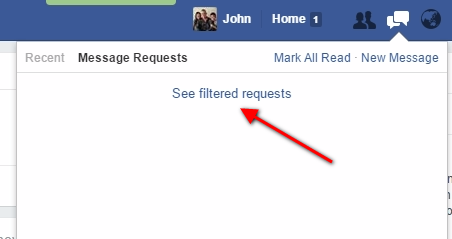
'non-friends' separating what they think may be 'junk' mail and popping it quietly into this obscure folder that only around 2% of Facebook users have ever heard of. So to check this third folder click on the Filtered Requests link INSIDE your Message requests folder and VOILA! There, at last, is that PM you were looking for, hidden away by Facebook who were convinced it couldn't possibly be of interest to you.
I have racked my brain to try and figure out why Facebook have this three tier system. Obviously it can be annoying getting 'spam' type messages too often but who are Facebook to decide what you should consider as unsuitable to read?

My suggestion is that you should do what I do and check the two 'lower tier' folders on a regular basis. You never know what you may have been missing.
For those who do want to advertise on Facebook without paying for the privilege then rather than bombard peoples message boxes (which, as you can see isn't effective as they may never get to see the message) it is best to post in Groups. To do this effectively use a quality 'Groups Autoposter' such as ToolsStar and do don't go too mad or Facebook will "Jail" you - But that's another story.....
Be successful and I'll see you next time.

John Ward
Please do leave comments below and share this article.

Recommended by KRA


![The 5 [Must Have] Skills you need as an Online Marketer](https://static.wixstatic.com/media/7fce86_956b845c1bcd4479a107980075a38da3~mv2_d_4000_2667_s_4_2.jpg/v1/fill/w_1789,h_1000,fp_0.50_0.50,q_30,blur_30,enc_avif,quality_auto/7fce86_956b845c1bcd4479a107980075a38da3~mv2_d_4000_2667_s_4_2.jpg)
![The 5 [Must Have] Skills you need as an Online Marketer](https://static.wixstatic.com/media/7fce86_956b845c1bcd4479a107980075a38da3~mv2_d_4000_2667_s_4_2.jpg/v1/fill/w_880,h_492,fp_0.50_0.50,q_90,enc_avif,quality_auto/7fce86_956b845c1bcd4479a107980075a38da3~mv2_d_4000_2667_s_4_2.jpg)


![The 5 [Must Have] Skills you need as an Online Marketer](https://static.wixstatic.com/media/7fce86_956b845c1bcd4479a107980075a38da3~mv2_d_4000_2667_s_4_2.jpg/v1/fill/w_1520,h_1000,fp_0.50_0.50,q_30,blur_30,enc_avif,quality_auto/7fce86_956b845c1bcd4479a107980075a38da3~mv2_d_4000_2667_s_4_2.jpg)
![The 5 [Must Have] Skills you need as an Online Marketer](https://static.wixstatic.com/media/7fce86_956b845c1bcd4479a107980075a38da3~mv2_d_4000_2667_s_4_2.jpg/v1/fill/w_152,h_100,fp_0.50_0.50,q_90,enc_avif,quality_auto/7fce86_956b845c1bcd4479a107980075a38da3~mv2_d_4000_2667_s_4_2.jpg)


Comments